本项目使用AP6212芯片为设备提供Wi-Fi/蓝牙功能,其中Wi-Fi从SDIO通道传输数据,蓝牙从串口通道传输数据,由前文HYM8563芯片为蓝牙提供32.768Khz时钟信号。
Wi-Fi
配置要点
AP6212仅支持SDIO v2.0模式- 使能脚(WL_REG_ON):
高电平使能,复位时拉低
- 唤醒中断脚(WL_HOST_WAKE):
高电平有效,默认拉低
DTS配置
1
2
3
4
5
6
7
8
9
10
11
12
13
14
15
16
17
18
19
20
21
22
23
24
25
26
27
28
29
30
31
32
33
34
35
36
37
38
39
40
41
42
43
44
45
46
47
|
&pinctrl {
sdio-pwrseq {
wifi_enable_h: wifi-enable-h {
rockchip,pins = <0 RK_PD4 RK_FUNC_GPIO &pcfg_pull_up>;
};
};
wireless-wlan {
wifi_wake_host_irq: wifi-host-wake-irq {
rockchip,pins = <0 RK_PD5 RK_FUNC_GPIO &pcfg_pull_down>;
};
};
};
&sdio_pwrseq {
clocks = <&hym8563>; # 时钟来源,若由RK809提供,则为:<&rk809 1>
clock-names = "ext_clock";
pinctrl-names = "default";
pinctrl-0 = <&wifi_enable_h>;
reset-gpios = <&gpio0 RK_PD4 GPIO_ACTIVE_LOW>;
};
&sdmmc1 {
max-frequency = <50000000>; # SDIO v2.0时钟50Mhz
supports-sdio;
bus-width = <4>;
disable-wp;
cap-sd-highspeed;
cap-sdio-irq;
keep-power-in-suspend;
mmc-pwrseq = <&sdio_pwrseq>;
non-removable;
pinctrl-names = "default";
pinctrl-0 = <&sdmmc1_bus4 &sdmmc1_cmd &sdmmc1_clk>;
# 注释为SDIO v2.0,反之为SDIO v3.0
status = "okay";
};
&wireless_wlan {
wifi_chip_type = "ap6212"; # 指定芯片型号
clocks = <&hym8563>; # 时钟来源,若由RK809提供,则为:<&rk809 1>
clock-names = "clk_wifi";
pinctrl-names = "default";
pinctrl-0 = <&wifi_wake_host_irq>;
WIFI,host_wake_irq = <&gpio0 RK_PD5 GPIO_ACTIVE_HIGH>;
};
|
遇到的问题
- 原理图标注的GPIO名字与实际接入的GPIO名字不符,导致芯片无法使能,注意检查原理图芯片另一端实际接入的GPIO脚
测试工具
蓝牙
配置要点
- 使能脚(BT_RST_N):
高电平使能,复位时拉低
- 主机唤醒蓝牙脚(BT_WAKE):
高电平唤醒,默认拉低
- 蓝牙唤醒主机脚(BT_HOST_WAKE):
高电平有效,默认拉低
- 串口必须配上CTSN脚,RTSN脚由蓝牙配置
DTS配置
1
2
3
4
5
6
7
8
9
10
11
12
13
14
15
16
17
18
19
20
21
22
23
24
25
26
27
28
29
30
31
32
33
34
35
36
37
38
|
&pinctrl {
wireless-bluetooth {
uart1_gpios: uart1-gpios {
rockchip,pins = <2 RK_PB5 RK_FUNC_GPIO &pcfg_pull_none>;
};
bt_reset: bt-reset {
rockchip,pins = <2 RK_PB7 RK_FUNC_GPIO &pcfg_pull_down>;
};
host_wake_bt: host-wake-bt {
rockchip,pins = <2 RK_PC1 RK_FUNC_GPIO &pcfg_pull_down>;
};
bt_wake_host_irq: bt-wake-host-irq {
rockchip,pins = <2 RK_PC0 RK_FUNC_GPIO &pcfg_pull_down>;
};
/delete-node/ uart8-gpios; # "rk3568-evb.dtsi"默认使用UART8,我们使用UART1,删除配置
};
};
&wireless_bluetooth {
compatible = "bluetooth-platdata";
clocks = <&hym8563>; # 时钟来源,若由RK809提供,则为:<&rk809 1>
clock-names = "ext_clock";
uart_rts_gpios = <&gpio2 RK_PB5 GPIO_ACTIVE_LOW>;
pinctrl-names = "default", "rts_gpio";
pinctrl-0 = <&uart1m0_rtsn &bt_reset &host_wake_bt &bt_wake_host_irq>;
pinctrl-1 = <&uart1_gpios>;
BT,reset_gpio = <&gpio2 RK_PB7 GPIO_ACTIVE_HIGH>;
BT,wake_gpio = <&gpio2 RK_PC1 GPIO_ACTIVE_HIGH>;
BT,wake_host_irq = <&gpio2 RK_PC0 GPIO_ACTIVE_HIGH>;
status = "okay";
};
&uart1 {
status = "okay";
pinctrl-names = "default";
pinctrl-0 = <&uart1m0_xfer &uart1m0_ctsn>;
};
|
Android配置
修改Android系统蓝牙使用的串口:
1
2
3
4
5
6
7
8
9
|
diff device/rockchip/rk356x/alpha/bt_vendor.conf

@@ -1,5 +1,5 @@
 # UART device port where Bluetooth controller is attached
-UartPort = /dev/ttyS8
+UartPort = /dev/ttyS1

 # Firmware patch file location
 FwPatchFilePath = /vendor/etc/firmware/
|
修改Android系统显示的蓝牙名称:
置空bdroid_buildcfg.h文件中的BTM_DEF_LOCAL_NAME宏定义,则蓝牙名称会配置为板级配置中的PRODUCT_MODEL属性。
1
2
3
4
5
6
7
8
9
10
|
diff device/rockchip/rk356x/bluetooth/bdroid_buildcfg.h

@@ -17,7 +17,7 @@
 #ifndef _BDROID_BUILDCFG_H
 #define _BDROID_BUILDCFG_H

-#define BTM_DEF_LOCAL_NAME     "rk3566"
+#define BTM_DEF_LOCAL_NAME     ""
 #define BTA_DM_COD {0x1A, 0x01, 0x10}
 #define BLE_PRIVACY_SPT FALSE
|
1
2
3
4
5
6
7
8
|
cat device/rockchip/rk356x/alpha/alpha.mk
......
PRODUCT_NAME := alpha_v10
PRODUCT_DEVICE := alpha_v10
PRODUCT_BRAND := kuretru
PRODUCT_MODEL := alpha
PRODUCT_MANUFACTURER := kuretru
......
|
遇到的问题
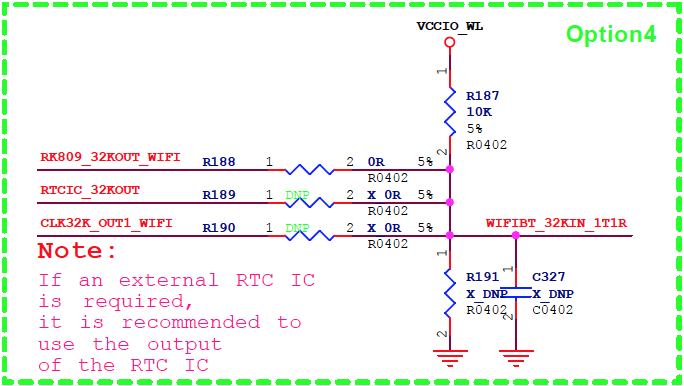
- 公版原理图默认时钟由
RK809提供,但是为了节省成本,没有贴相应的晶震,而转由HYM8563提供,但是对应的时钟通路并没有切换到HYM8563,因此需要下图中的R188电阻,上R189电阻
排查步骤
- 两个唤醒脚有没有配反
- 示波器量32.768Khz时钟有没有出来
FM广播
暂未配置。