由于项目有三屏异显的要求,因此必须把RK3568的三路VOP都利用起来,而VOP-Port2只能输出LVDS或RGB888或BT1120/656格式的信号,因此采用一块RK628D视频桥接芯片将RGB888信号转换为其他信号,项目上选择转换为双路LVDS信号。
RK628D芯片配置
原理图分析
RK628D_I2CSEL:被拉低,因此I2C地址为0x50(拉高为0x51)- 芯片工作时钟24Mhz由RK3568给出
配置要点
- 供电使能脚:
高电平有效,默认拉低
- 复位脚(RESET):
低电平有效,默认拉高
- 中断脚(INT):
高电平有效,默认浮空
- 工作时钟:由RK3568的
REFCLK_OUT(GPIO0_A0)给出
DTS配置
1
2
3
4
5
6
7
8
9
10
11
12
13
14
15
16
17
18
19
20
21
22
23
24
25
26
27
28
29
30
31
32
33
34
35
36
37
38
39
40
41
42
43
44
45
46
47
48
49
50
51
52
53
54
55
56
57
58
59
60
61
62
63
64
65
66
67
68
69
70
71
72
73
74
75
76
77
78
79
80
81
|
&pinctrl {
rk628 {
rk628_int: rk628-int {
rockchip,pins = <4 RK_PC3 RK_FUNC_GPIO &pcfg_pull_none>;
};
rk628_enable: rk628-enable {
rockchip,pins = <0 RK_PD6 RK_FUNC_GPIO &pcfg_pull_down>;
};
rk628_reset: rk628-reset {
rockchip,pins = <4 RK_PD2 RK_FUNC_GPIO &pcfg_pull_up>;
};
};
};
&i2c3 {
status = "okay";
clock-frequency = <400000>;
rk628: rk628@50 {
status = "okay";
reg = <0x50>;
interrupt-parent = <&gpio4>;
interrupts = <RK_PC3 IRQ_TYPE_LEVEL_HIGH>;
enable-gpios = <&gpio0 RK_PD6 GPIO_ACTIVE_HIGH>;
reset-gpios = <&gpio4 RK_PD2 GPIO_ACTIVE_LOW>;
assigned-clocks = <&pmucru CLK_WIFI>;
assigned-clock-rates = <24000000>;
pinctrl-names = "default";
pinctrl-0 = <&refclk_pins &rk628_int &rk628_enable &rk628_reset>;
};
};
#include <arm/rk628.dtsi>
&rk628_xin_osc0_func {
compatible = "fixed-factor-clock";
clocks = <&pmucru CLK_WIFI>;
clock-mult = <1>;
clock-div = <1>;
};
&rk628_combrxphy {
status = "okay";
};
&rk628_combtxphy {
status = "okay";
};
&rk628_post_process {
pinctrl-names = "default";
pinctrl-0 = <&rk628_vop_pins>;
status = "okay";
mode-sync-pol = <0>;
ports {
#address-cells = <1>;
#size-cells = <0>;
port@0 {
reg = <0>;
post_process_in_rgb: endpoint {
remote-endpoint = <&rgb_out_post_process>;
};
};
port@1 {
reg = <1>;
post_process_out_lvds: endpoint {
remote-endpoint = <&lvds_in_post_process>;
};
};
};
};
|
RGB信号输入配置
1
2
3
4
5
6
7
8
9
10
11
12
13
14
15
16
17
18
19
20
21
22
23
24
|
&rgb_in_vp2 {
status = "okay";
};
&rgb {
status = "okay";
pinctrl-names = "default";
pinctrl-0 = <&lcdc_ctl>;
ports {
port@1 {
reg = <1>;
rgb_out_post_process: endpoint {
remote-endpoint = <&post_process_in_rgb>;
};
};
};
};
&route_rgb {
status = "disabled";
};
|
LVDS信号输出配置
1
2
3
4
5
6
7
8
9
10
11
12
13
14
15
16
17
18
19
20
21
22
23
|
&rk628_lvds {
status = "okay";
rockchip,link-type = "dual-link-odd-even-pixels";
ports {
#address-cells = <1>;
#size-cells = <0>;
port@0 {
reg = <0>;
lvds_in_post_process: endpoint {
remote-endpoint = <&post_process_out_lvds>;
};
};
port@1 {
reg = <1>;
lvds_out_panel: endpoint {
remote-endpoint = <&panel_in_lvds>;
};
};
};
};
|
LVDS屏幕配置
关于屏幕参数配置请参考前文《RK3568系列14——屏幕参数公共配置》。
1
2
3
4
5
6
7
8
9
10
11
12
13
14
15
16
17
18
19
20
21
22
23
24
25
26
27
28
29
30
31
32
33
34
35
36
37
38
39
40
41
42
43
44
45
46
47
48
49
50
51
52
53
54
55
56
57
58
59
60
61
62
63
64
65
66
67
68
69
70
71
72
73
74
75
76
77
78
79
80
81
82
83
84
85
86
87
88
89
90
91
92
93
94
|
#include <dt-bindings/display/media-bus-format.h>
/ {
lvds-panel {
compatible = "simple-panel";
power-supply = <&vcc5v0_lvds_panel>;
enable-gpios = <&gpio4 RK_PA0 GPIO_ACTIVE_HIGH>;
pinctrl-names = "default";
pinctrl-0 = <&lvds_panel_enable>;
backlight = <&backlight>;
prepare-delay-ms = <10>;
enable-delay-ms = <50>;
disable-delay-ms = <50>;
unprepare-delay-ms = <10>;
reset-delay-ms = <500>;
init-delay-ms = <500>;
width-mm = <476>;
height-mm = <268>;
bus-format = <MEDIA_BUS_FMT_RGB888_1X7X4_SPWG>;
data-mapping = "vesa-24";
display-timings {
native-mode = <&lcd_boe_hr215wu1_120>;
lcd_boe_hr215wu1_120: lcd-boe-hr215wu1-120 {
clock-frequency = <149000000>;
hactive = <1920>;
hfront-porch = <140>;
hback-porch = <70>;
hsync-len = <70>;
vactive = <1080>;
vfront-porch = <24>;
vback-porch = <12>;
vsync-len = <9>;
hsync-active = <0>;
vsync-active = <0>;
de-active = <0>;
pixelclk-active = <0>;
};
};
port {
panel_in_lvds: endpoint {
remote-endpoint = <&lvds_out_panel>;
};
};
};
vcc5v0_lvds_panel: vcc5v0-lvds-panel{
compatible = "regulator-fixed";
regulator-name = "vcc5v0_lvds";
regulator-min-microvolt = <5000000>;
regulator-max-microvolt = <5000000>;
vin-supply = <&vcc5v0_sys>;
regulator-boot-on;
regulator-state-mem {
regulator-off-in-suspend;
};
};
vcc5v0_lvds_backlight: vcc5v0-lvds-backlight {
compatible = "regulator-fixed";
regulator-name = "vcc5v0_lvds_backlight";
regulator-min-microvolt = <5000000>;
regulator-max-microvolt = <5000000>;
vin-supply = <&vcc5v0_lvds_panel>;
regulator-boot-on;
regulator-state-mem {
regulator-off-in-suspend;
};
};
};
&pinctrl {
lvds {
lvds_panel_enable: lvds-panel-enable {
rockchip,pins = <4 RK_PA0 RK_FUNC_GPIO &pcfg_pull_down>;
};
lvds_backlight_enable: lvds-backlight-enable {
rockchip,pins = <4 RK_PC4 RK_FUNC_GPIO &pcfg_pull_up>;
};
};
&backlight {
status = "okay";
pwms = <&pwm14 0 25000 1>;
power-supply = <&vcc5v0_lvds_backlight>;
enable-gpios = <&gpio4 RK_PC4 GPIO_ACTIVE_LOW>;
pinctrl-names = "default";
pinctrl-0 = <&lvds_backlight_enable>;
};
|
遇到的问题
- DTS配置完毕,屏幕没有信号输出,经示波器测量,RK3568->RK628D的RGB信号没有。经过RK协助排查,是早期的
RK3568-Android11的SDK有BUG所致,CPU没有输出RGB信号,有bug的内核版本为android-11.0-mid-rkr8,升级到最新版本(android-11.0-mid-rkr9.1)后解决
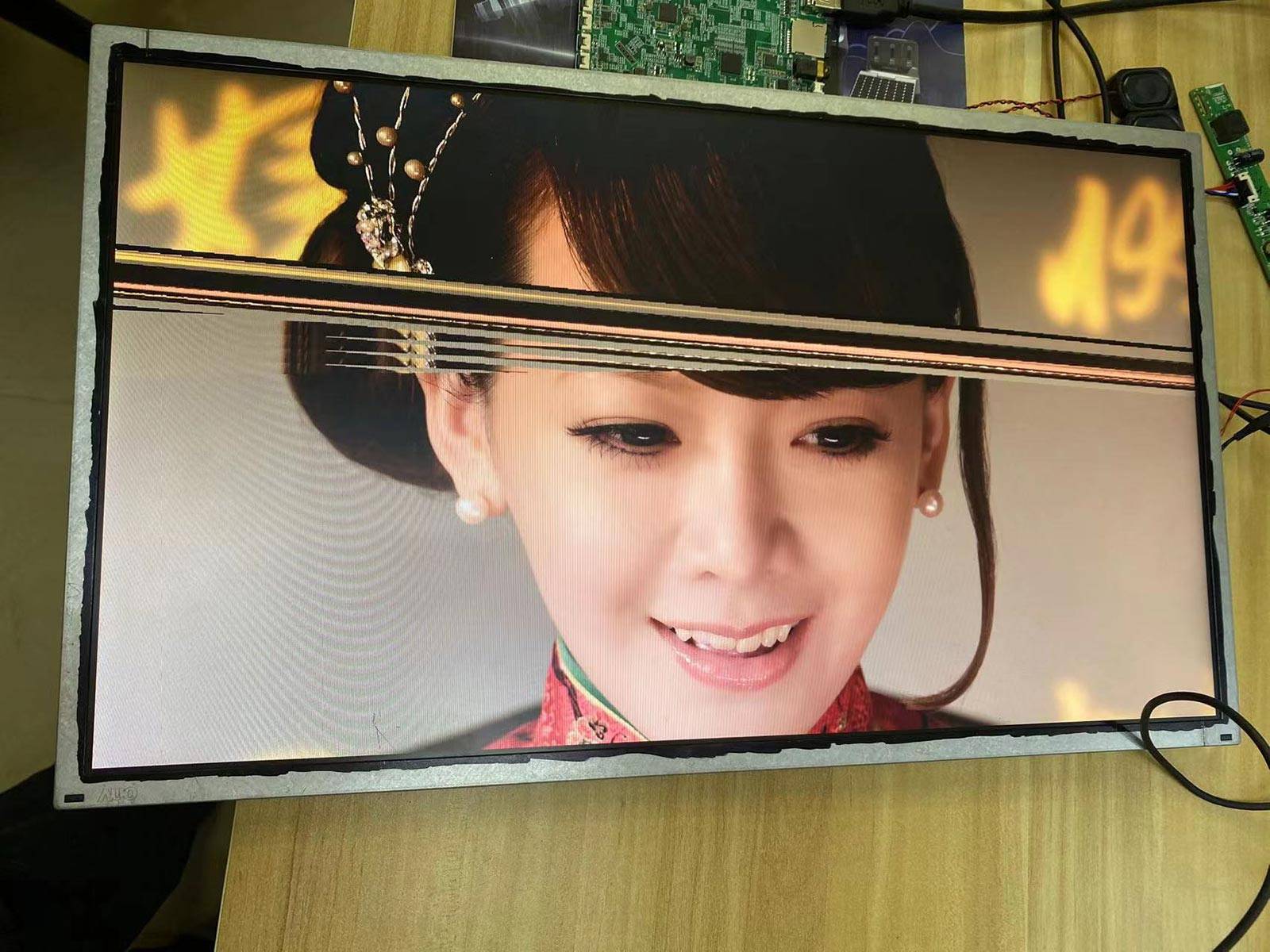
- 屏幕输出有小部分区域显示异常,如图2所示。经过RK协助排查,为输出时钟频率异常所致,需给内核打上特殊补丁
参考文档
- RKDocs/common/display/Rockchip_DRM_RK628_Porting_Guide_CN.pdf
- Rockchip_RK628D_For_All_Porting_Guide_CN_V10.pdf